

Reduce the BigQuery cost of incremental loads with partition-aware import
Make incremental loads into a large partitioned BigQuery table read and bill only the partitions the new rows touch: requirements, setup and how to check it is used.
On BigQuery, partition-aware import makes an incremental load deduplicate only against the partitions the new rows belong to, so BigQuery reads (and bills) those partitions instead of the whole destination table. It is an option of the table output mapping.
How it works
Section titled “How it works”On an incremental load with a primary key, Keboola deduplicates the new rows against the destination table. On a large table, this step reads the whole destination table even when the new rows touch only a few days. With partition-aware import:
- Before deduplication, Keboola reads the distinct values of the destination’s partitioning column from the loaded data.
- It adds a filter on that column to the deduplication statement, for example
AND dest.`date` IN ('2026-10-12', '2026-10-13'). ForDATETIMEandTIMESTAMPcolumns, the filter is a time range for each partition (in UTC forTIMESTAMP). - BigQuery prunes all other partitions of the destination table.
The data loaded into the table is the same as without the option; only the amount of data BigQuery reads changes.
It helps most when each load touches a small part of a large table, typically daily or hourly loads that write only recent dates. If a load contains rows spread across most partitions, the filter saves little.
Before you start
Section titled “Before you start”The option takes effect only when all of the following conditions are met. If any of them is not met, the load runs as before, without an error.
-
The project uses the BigQuery backend.
-
Incremental is enabled and a Primary key is set.
-
The destination table is partitioned by a column:
- time-unit column partitioning on a
DATE,DATETIME, orTIMESTAMPcolumn (HOUR,DAY,MONTH, orYEAR), or - integer-range partitioning on an
INT64column.
Ingestion-time partitioning is not supported.
- time-unit column partitioning on a
-
The partitioning column is part of the primary key.
-
The loaded data contains at most 4,000 distinct values of the partitioning column. For time-unit partitioning, the values are counted per partition unit (e.g., per day for
DAYpartitioning); for integer-range partitioning, every distinct integer counts, even when several of them fall into the same range partition. Above the limit, the deduplication runs without the filter. This does not lift BigQuery’s own limit on the number of partitions a single job can modify.
Set it up
Section titled “Set it up”Goal: an incremental output mapping whose deduplication reads only the partitions it loads into.
-
Partition the destination table. Partitioning is set when a table is created; it cannot be added to an existing table.
- New table: create it with kbagent (
kbagent storage create-tablewith--time-partitioning-typeand--time-partitioning-field, or the--range-partitioning-*options), or with the table definition API (opens in a new tab) (timePartitioningorrangePartitioning). Always set the partitioning column (--time-partitioning-fieldin kbagent): without it the table is partitioned by ingestion time, which partition-aware import does not support. - Existing table: create a partitioned copy with
kbagent storage create-table --source-table-id, then replace the original withkbagent storage swap-tables. The swap always runs in a branch (--branch, or the one set bykbagent branch use), and aliases are not transferred: they keep pointing at the old position and show the other table’s data after the swap. See the kbagent command reference.
- New table: create it with kbagent (
-
Include the partitioning column in the primary key, both on the table (
--primary-keywhen creating it) and in the output mapping. This changes the deduplication: two rows with the same key but a different partitioning value (e.g., a differentdate) are kept as two rows. -
Enable the option in the table output mapping by checking Partition-aware import. The checkbox is shown only when Incremental loading is enabled and a primary key is set.
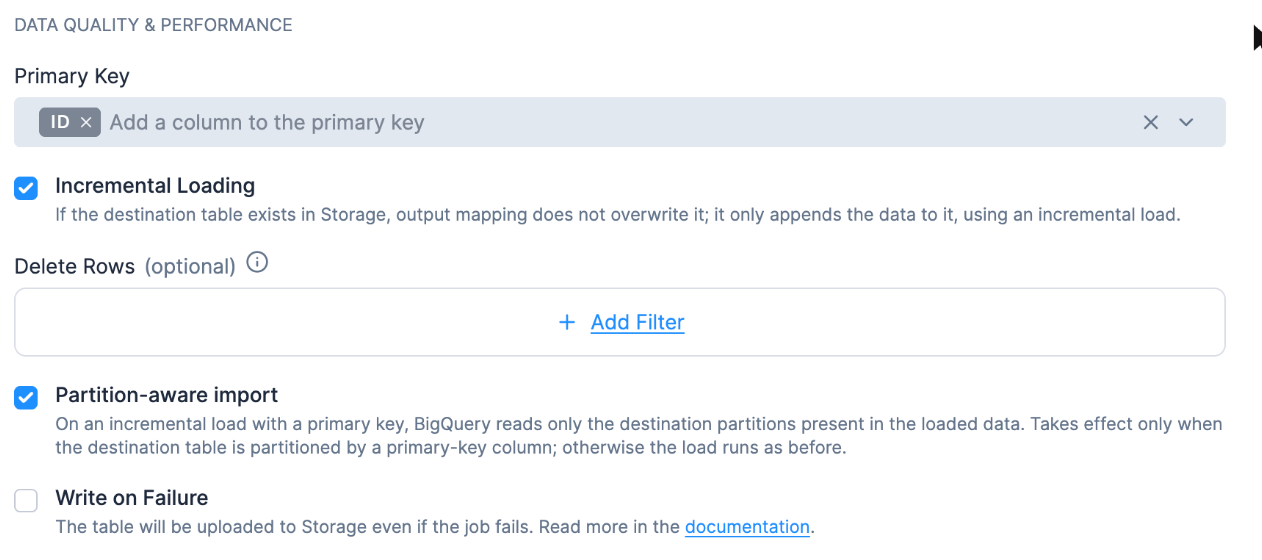
In the configuration JSON, the option is stored as
partition_aware_import:{"source": "out_product_prices","destination": "out.c-prices.out_product_prices","incremental": true,"primary_key": ["product_id", "date"],"partition_aware_import": true}
Result: when all the conditions in Before you start are met, the next incremental load reads only the destination partitions that its rows belong to.
Check that it is used
Section titled “Check that it is used”- The parameters of the storage import job and the
storage.tableImportStartedandstorage.tableImportDoneevents of the job showpartitionAwareImport: true. This only confirms that the option was enabled for the load, not that the filter was applied. - Whether the filter was applied shows in the BigQuery job history of the project: the deduplication statement
(
MERGE, orUPDATE,DELETE, andINSERT) contains the filter on the partitioning column, and its bytes processed drop accordingly.
Was this page helpful?
Thank you for helping improve Keboola's documentation!