

SuiteProjects Pro
Extract projects, tasks, time entries, invoices, approvals and about 160 other object types from NetSuite SuiteProjects Pro, formerly OpenAir, through its XML API.
NetSuite SuiteProjects Pro, formerly NetSuite OpenAir, is a professional services automation suite. The SuiteProjects Pro data source connector reads it through the XML API, which covers about 160 object types, including projects, tasks, time entries, invoices, charges, approvals and revenue recognition, several of which the REST API does not expose. One configuration row reads one object type into one table.
Incremental fetch is the default: after the first run, each run reads only the objects changed since the previous one, which keeps the requests against the account’s shared API limits small. A row can also read the approval history of expense reports and timesheets, write custom fields into a separate table, and store attachment files in Keboola File Storage.
Prerequisites
Section titled “Prerequisites”- API access, a licensed SuiteProjects Pro add-on. When it is enabled for the account, SuiteProjects Pro issues the API namespace and the API key.
- A dedicated API user that signs in with a password. Single sign-on does not work for the API. The connector reads only the objects that this user’s role and filter sets allow.
- The account-specific domain from the address bar after you sign in.
Configuration
Section titled “Configuration”Create a new configuration of the SuiteProjects Pro data source connector.
Connection
Section titled “Connection”| Field | Description |
|---|---|
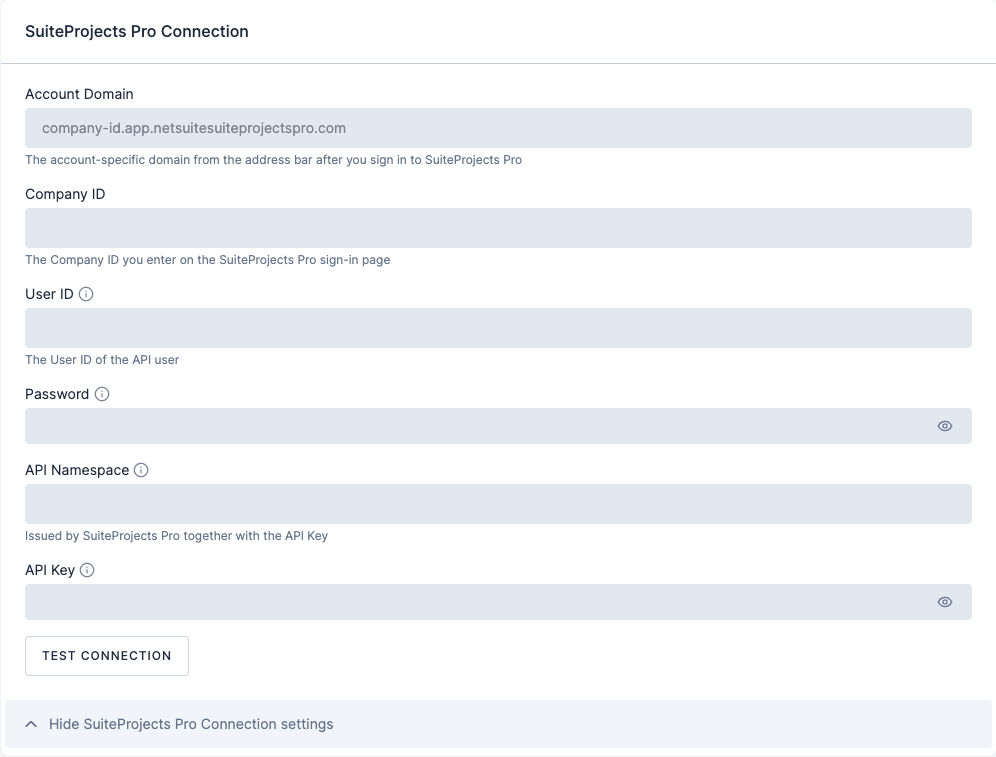
| Account domain | The account-specific domain from the address bar after you sign in to SuiteProjects Pro. |
| Company ID | The company ID you enter on the sign-in page. |
| User ID | The user ID of the API user. |
| Password | The API user’s password. Stored encrypted. |
| API namespace | Issued by SuiteProjects Pro together with the API key. |
| API key | Stored encrypted. |
Click Test connection, then save.
Row configuration
Section titled “Row configuration”Click Add Row for each object type. A row has four parts.
Source
| Field | Description |
|---|---|
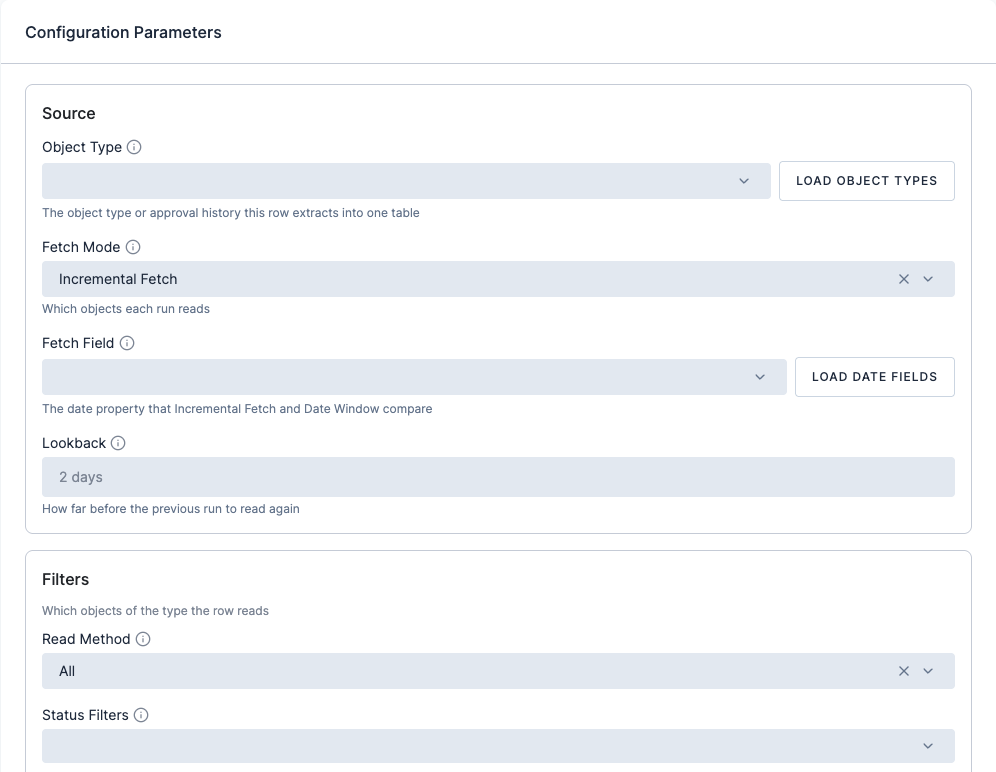
| Object type | The object type, or approval history, this row extracts into one table. Click Load object types to pick from the list. |
| Fetch mode | Incremental fetch (default) reads only the objects changed since the previous run. Full fetch reads all of them. Date window reads the objects between Date start (included) and Date end (excluded). |
| Fetch field | The date property that incremental fetch and date window compare. Click Load date fields to pick from the object type’s dates. updated is the last change of an object and suits incremental fetch; pick another date, such as date of Task, for a date window. |
| Lookback | How far before the previous run to read again, as a whole number of minutes, hours, days or weeks, for example 2 days or 6 hours. The connector always adds an overlap of its own on top. |
| Date start, Date end | Bounds of the date window in SuiteProjects Pro server time; Date start is included and Date end excluded. Enter YYYY-MM-DD, YYYY-MM-DD HH:MM:SS or a relative value such as 30 days ago, yesterday or today. |
Some object types add options of their own, for example Download files and Keep files permanently for attachments, Base currency and Rate precision for exchange rates, or Include placeholder users for users.
Filters
| Field | Description |
|---|---|
| Read method | All objects of the type, objects equal to or not equal to a field value, or the objects of selected users or projects. |
| Conditions and date conditions | Field and value pairs, or date comparisons, that narrow the read. |
| Status filters | Only objects in the selected statuses. |
| Not exported to | Only the objects not yet exported to this application, as ImportExport names it. |
Destination
| Field | Description |
|---|---|
| Table name | Storage table name. Empty uses the object type in lowercase. |
| Load type | Incremental load (default) updates rows by primary key and keeps the rest. Full load replaces the table: with full fetch it mirrors SuiteProjects Pro, with incremental fetch or a date window the table holds only each run’s objects. Object types without a primary key, such as Term, need full load. |
Read options
| Field | Description |
|---|---|
| Columns | The properties to read. Empty reads all of them. |
| Batch size | Objects per API request, at most 1,000. |
| Custom fields | Inline columns (default) writes custom field values as columns, Separate table writes them to their own table, optionally only the named custom fields, and Off skips them. |
| Include deleted | Also reads the objects marked as deleted and flags them in an is_deleted column. |
Output
Section titled “Output”One table per row, named after the object type in lowercase unless you set a table name. With custom fields set to a separate table, their values land in their own table. Attachment contents go to File Storage when Download files is on.
Limits
Section titled “Limits”Every request counts against the account’s API limits for 60 seconds and for 24 hours, which the account shares with its other integrations. Keep row parallelism off, and keep incremental fetch wherever the object type has an updated field.
Was this page helpful?
Thank you for helping improve Keboola's documentation!