

OAuth 1.0 Authentication
The oauth10 type in Generic Extractor is not yet supported (the test endpoint button fails); published components only, tested by injecting oauth_token.
OAuth 1.0 authentication is one of the two OAuth methods and
is supported only for published components.
It is configured by setting the type key to oauth10:
{ "api": { ..., "authentication": { "type": "oauth10" } }, "config": { ... }}No other configuration parameters are necessary (nor available). The OAuth authentication process is described by the following diagram (opens in a new tab):
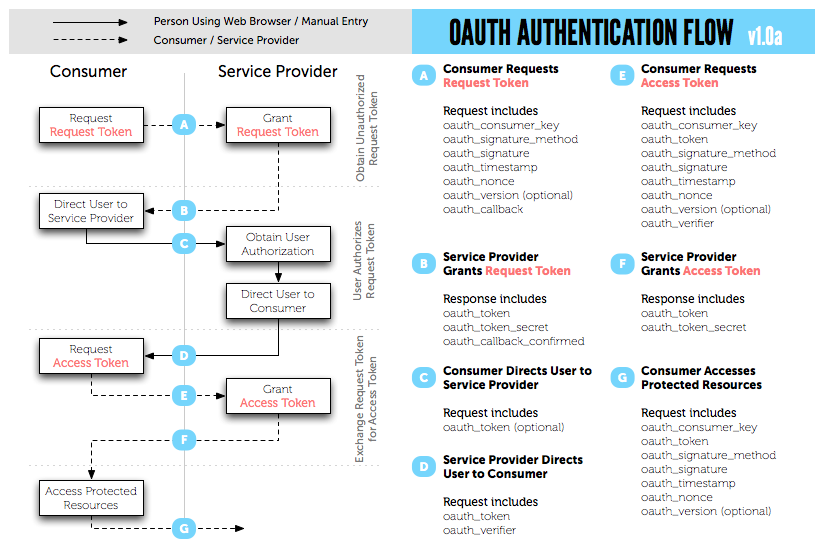
In the diagram, only the step G represents the actual communication with the API (extraction of data).
The final authorization section of the Generic Extractor configuration is generated between
steps F and G. When a component is published, the steps A - F of the process are handled by
Keboola (and the end-user).
To develop and test a new component with the OAuth authorization, go through
the steps A - F manually. At the last step, you obtain a response containing the fields
oauth_token and oauth_token_secret, e.g.:
{ "oauth\_token": "JohnDoe1234", "oauth\_token\_secret": "TopSecret5678"}Then, inject the OAuth credentials into the configuration root:
{ "parameters": { "api": { ... }, "config": { ... } }, "authorization": { "oauth_api": { "credentials": { "#data": "{\"oauth\_token\":\"JohnDoe1234\",\"oauth\_token\_secret\":\"TopSecret5678\"}", "appKey": 1234, "#appSecret": "TopSecret" } } }}The authorization field has a single property oauth_api, which has a single property credentials with three child properties:
#data— contains the response from the service provider, the response is a JSON string (not an object!).appKey— contains the Consumer Key (opens in a new tab).#appSecret— contains the Consumer Secret (opens in a new tab) (use an empty string if not used by the service provider).
With the above configuration, Generic Extractor generates the Authorization header; the signature
method used is HMAC-SHA1 (opens in a new tab). For example:
Authorization: OAuth oauth_consumer_key="1234", oauth_nonce="72469d96572dabb4d0ea02b057ea4f246d722b72", oauth_signature="zl0y5CyySCPj8IqODV3Egjqgg6Q%3D", oauth_signature_method="HMAC-SHA1", oauth_timestamp="1492904452", oauth_token="JohnDoe1234", oauth_version="1.0"The full configuration is, e.g.:
{ "parameters": { "api": { "baseUrl": "http://example.com/", "authentication": { "type": "oauth10" } }, "config": { "debug": true, "outputBucket": "mock-server", "jobs": [ { "endpoint": "users", "dataType": "users" } ] } }, "authorization": { "oauth_api": { "credentials": { "#data": "{\"oauth_token\":\"userToken\",\"oauth_token_secret\":\"tokenSecret\"}", "appKey": 1234, "#appSecret": "TopSecret" } } }}See example [EX102] (opens in a new tab) or learn more about Keboola-OAuth integration.
Was this page helpful?
Thank you for helping improve Keboola's documentation!