

Notifications
Keboola Notifications Guide
Section titled “Keboola Notifications Guide”Notifications in Keboola can be set up at various levels — from individual jobs and flows within a project to organization-wide credit usage. This guide outlines all available notification types, when to use them, and how to configure them. Notifications help you stay informed about the status of flows, jobs, apps and credit consumption — either via email or webhooks.
Overview of Notification Types
Section titled “Overview of Notification Types”1. Flow Notifications
Section titled “1. Flow Notifications”- Notify users about Flow results: success, error, or an unusually long run.
- They cover the flow as a whole, not individual components — for that, see Job Notifications.
- Recipients can be project users, other email addresses, or webhook URLs.
How to Configure
Section titled “How to Configure”An automated flow runs without anyone watching it, so if it fails, nobody finds out unless notifications are set.
Open the flow and go to the Notifications tab. The tab has one card per event, and each card takes recipients directly — there is nothing to save separately.
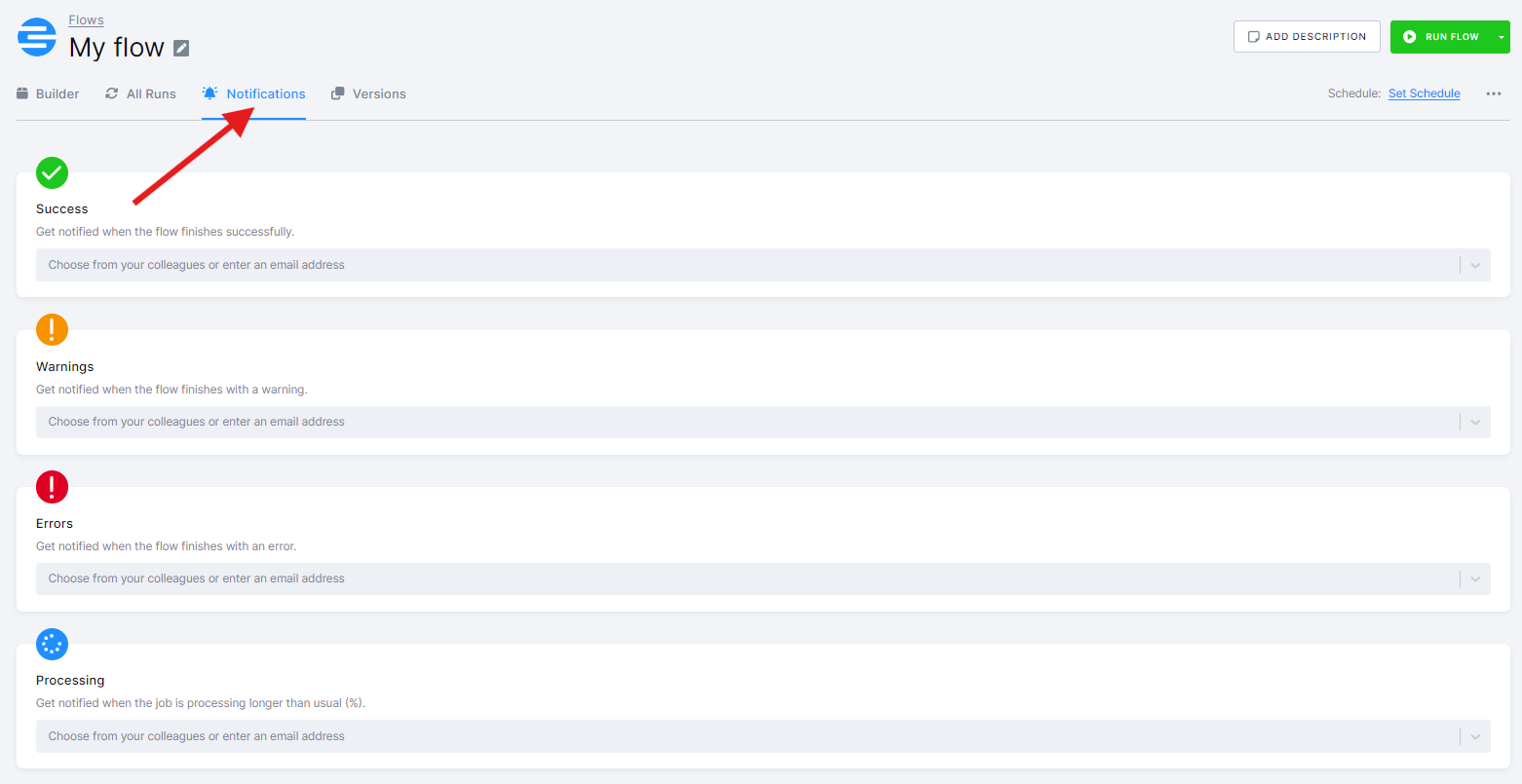
Notifications can be sent when:
- The flow finishes successfully.
- The flow finishes with an error.
- The flow is still processing well past its usual run length. The overtime is expressed as a percentage of the usual length — e.g., at 20%, a flow that normally takes 100 minutes notifies once it is still running after 120. The usual length is a running average of recent executions.
The cards above are the ones a Conditional Flow has. Legacy Flows also carry a Warnings card, because a legacy task with Continue on Failure enabled lets the flow finish with a warning status; Conditional Flows express the same rule as a condition instead. See the migration guide.
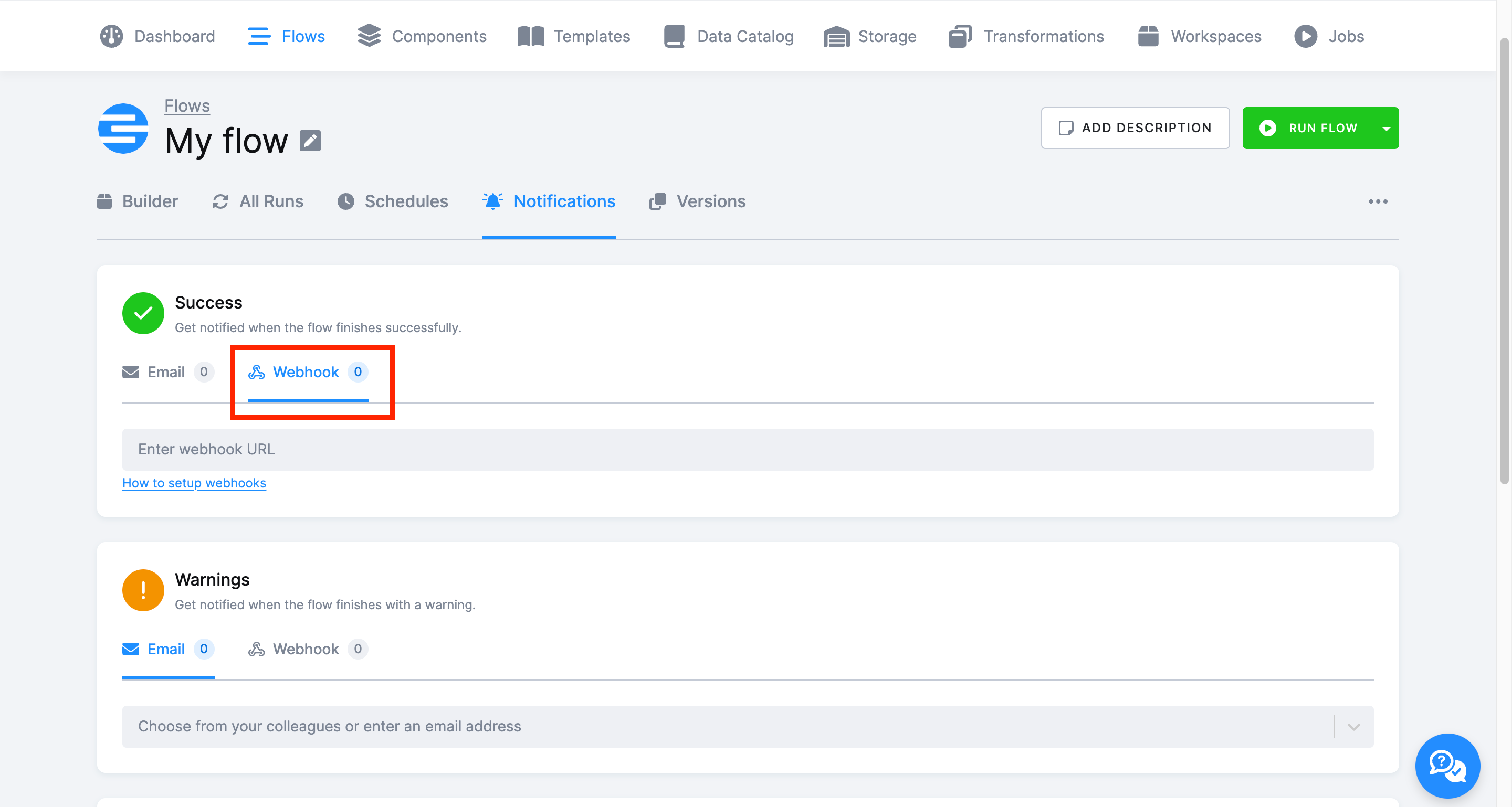
Each card offers Email and Webhook delivery on separate sub-tabs; the count next to each tells you how many recipients are already configured. For emails, pick project users from the dropdown or type any address.
2. Job Notifications
Section titled “2. Job Notifications”- Receive updates about success or failure of individual component jobs. Job Notifications might be especially helpful if you need a notification on status of a specific component within a more complex flow.
How to Configure
Section titled “How to Configure”Open a component configuration and go to the Notifications tab:
- Enter email addresses or webhook URLs.
- Works similarly to Flow notifications.
Use this to monitor specific transformations, data loads, or other components individually.
3. App Notifications
Section titled “3. App Notifications”- Get notified when an App task completes, fails, or runs significantly longer than expected.
- Since apps are often used by external users, notifications help ensure any issues or downtime are addressed as quickly as possible.
How to Configure
Section titled “How to Configure”App notifications are configured within the component configuration of the app itself.
- Go to the configuration of your app (e g., Deepnote Notebook Execution Trigger).
- Open the Notifications tab.
- Enter one or more email addresses or webhook URLs.
4. Credit Consumption Notifications
Section titled “4. Credit Consumption Notifications”- Send alerts when credit usage crosses a threshold.
- Email notifications only, configured at the organization level.
- Only email notifications are supported — webhook delivery is not available for this type.
- More info: Telemetry Email Notifications.
Webhook Notifications
Section titled “Webhook Notifications”Keboola supports webhook notifications alongside email. This allows real-time alerting in monitoring, logging, or incident tools like DataDog, Opsgenie, or your internal systems.
How It Works
Section titled “How It Works”- Webhook Setup: Add a webhook URL in the Notifications tab of any Flow or Job.
- Payload Format: JSON via HTTP
POSTrequest withapplication/jsoncontent-type. - Simple Integration: No custom headers or payload transformations at this stage.
- Timeout & Retry: 5-second timeout, no retries — ensure your endpoint is reliable.
Supported For
Section titled “Supported For”- Flow notifications
- Job notifications
Example Payload
Section titled “Example Payload”{ "job": { "id": "113939672", "url": "https://connection.north-europe.azure.keboola.com/admin/projects/20570/queue/113939672", "tasks": [], "endTime": "2025-04-02T11:14:33+00:00", "component": { "id": "keboola.orchestrator", "name": "Orchestrator" }, "startTime": "2025-04-02T11:13:39+00:00", "configuration": { "id": "113939398", "name": "Example flow" } }, "branch": { "id": "277810" }, "project": { "id": "20570", "name": "Example project" }, "eventType": "job-succeeded"}Current limitations
Section titled “Current limitations”The webhook feature currently sends the full raw event data as a JSON POST request. Custom payload formatting is not yet supported.
As a result, some third-party systems—such as Slack, Microsoft Teams, or Discord—may not accept or display these webhook messages correctly, as they require a specific payload structure (e.g., { “text”: “message” } for Slack).
Best Practices
Section titled “Best Practices”- Use group email addresses for notifications to ensure team-wide awareness of critical issues.
- Always configure error notifications for production flows to avoid missing failures.
- Schedule flows during off-peak hours to minimize resource contention and optimize performance.
- Set up webhook endpoints to track jobs in external systems.
Was this page helpful?
Thank you for helping improve Keboola's documentation!