

API Key Authentication
API Key token authentication sends a token in either a header or query parameter of each API request.
E.g., Headers: X-StorageApi-Token:your_token
This method is available through UI. You can select the Api Key Auth method and fill in the token.
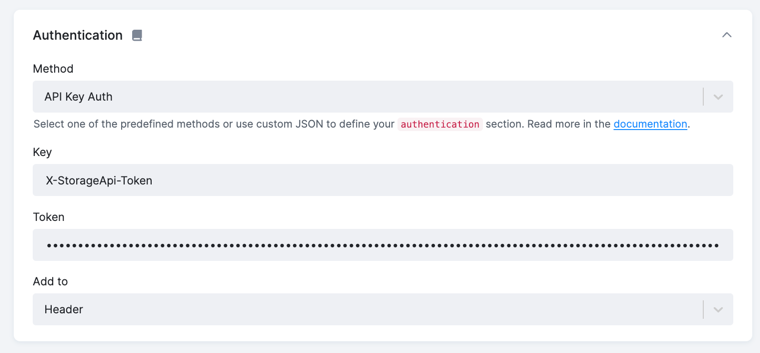
Configuration parameters
Section titled “Configuration parameters”Key- arbitrary name of the header or query parameter key, e.g.,X-StorageApi-TokenToken- the actual token valueAdd to- where to add the token, either to the headers or query parameters
In the underlying JSON, the API Key is implemented as follows:
Place your token into the config.#__AUTH_TOKEN parameter. It is then referenced in the header or query parameter via the attr function.
Header section
{ "api": { "...": "...", "http": { "headers": { "X-StorageApi-Token": { "attr": "#__AUTH_TOKEN" } } } }, "config": { "#__AUTH_TOKEN": "secret", "jobs": ["..."] }}Query section
{ "api": { "...": "...", "http": { "defaultOptions": { "params": { "X-StorageApi-Token": { "attr": "#__AUTH_TOKEN" } } } } }, "config": { "#__AUTH_TOKEN": "secret", "jobs": ["..."] }}